Physical Address
304 North Cardinal St.
Dorchester Center, MA 02124
Physical Address
304 North Cardinal St.
Dorchester Center, MA 02124
Imagine this.
You’re playing an offline game on your phone. No Wi-Fi. No mobile data. You reach a difficult level, close the game, and come back hours later.
Your progress is still there. Exactly where you left it.
No magic. No internet.
So… how does this actually work?
Let’s open the curtain 👀
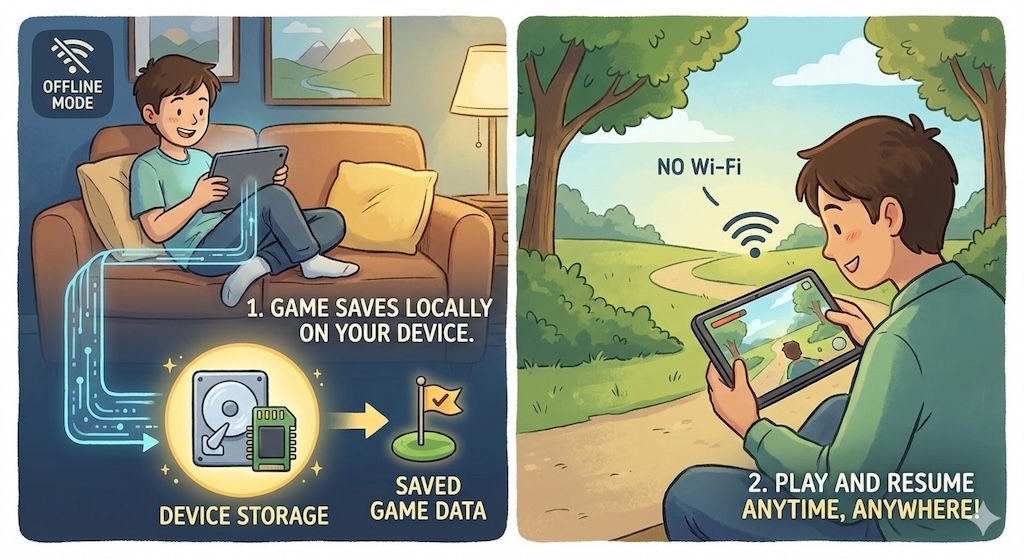
Offline games don’t send your progress to the internet.
Instead, they store your game data directly inside your device.
This data includes:
Your phone acts like a tiny vault 🔐 for the game.
Games usually save progress in local storage, such as:
The game creates hidden files inside your phone’s storage that only it can access.
These files store things like:
That’s why uninstalling a game often deletes your progress.
For simple games, developers use a lightweight system to store:
This method is fast and perfect for casual or puzzle games.
Bigger offline games use local databases to store complex data:
Everything stays on your device, even without internet.
When you:
The game quickly writes your progress to storage.
Next time you open it, the game:
All within milliseconds ⚡
Offline games:
That’s why they:
You may lose progress if:
This is why some games ask for storage permissions.
| Feature | Offline Games | Online Games |
|---|---|---|
| Internet Needed | ❌ No | ✅ Yes |
| Save Location | Phone storage | Cloud server |
| Speed | Very fast | Depends on internet |
| Data Safety | Risk if deleted | Safer with account |
Developers love offline saving because:
That’s why offline games remain popular even today.
Every time an offline game remembers your progress,
your phone quietly whispers:
“I’ve got this.”
No servers. No signals. Just smart design.
If you enjoy knowing how games work behind the scenes, you’re already thinking like a game developer 🧠🎮